When software applications deal with extreme scales, from quantum atomic distances to astronomical measurements, standard decimal literals become impractical. Programming languages rely on scientific notation to parse, store, and display exceptionally large or small numbers without cluttering code with dozens of leading or trailing zeros.
Understanding how languages parse and store scientific notation is essential for software engineers, data scientists, and scientific computing professionals to avoid subtle calculation errors and precision loss.
Table of Contents
What Is Scientific Notation in Programming Languages?
In programming, scientific notation is a numeric literal format used to express floating-point numbers in terms of powers of ten. Instead of writing 0.000000000106 or 602200000000000000000000, programmers write 1.06e-10 and 6.022e23.
An expression like 1.06e-10 consists of three core components:
- Mantissa / Significand (1.06): The numerical value representing the significant digits.
- Exponential Indicator (e / E): The separator character signaling “times ten to the power of”.
- Exponent (-10): The integer power of ten by which the significand is multiplied.
When a compiler or interpreter encounters a literal containing an e or E between numbers, it evaluates the expression as a floating-point data type (typically float64 or double).
Why Programming Languages Use Scientific Notation for Numbers
- Readability and Code Maintainability: Eliminates the need to manually count zeros in source code, drastically reducing typos.
- Memory Efficiency: Allows compiler parsers to convert textual representations directly into fixed-width binary floating-point types.
- Automated Output Formatting: Runtime environments automatically shift to scientific notation when a number exceeds standard display widths to maintain clean console output.
- Range Extension: Enables standard 64-bit float types to represent values as tiny as ≈ 5 * 10 ^ – 324 and as large as approx 1.8 * 10 ^ 308
How Scientific Notation Is Represented in Code Syntax
Virtually all major programming languages share a unified syntax for scientific notation literals, though data typing rules differ.
Syntax Reference Across Popular Languages
| Language | Valid Literal Example | Evaluated Data Type | Notes |
| Python | 6.022e23 | float | Always evaluates to a 64-bit float. |
| JavaScript | 1.06e-10 | Number | All numbers in JS are double-precision floats. |
| C / C++ | 3.0e8 | double | Append f (3.0e8f) for single-precision float. |
| Java | 1.6e-19 | double | Append f (1.6e-19f) for single-precision float. |
| Rust | 2.997_924_58e8 | f64 | Supports underscores for readability inside literals. |
Case Sensitivity and Formatting Rules
- Case Insensitive: Both 1.06e-10 and 1.06E-10 are identical in code.
- Optional Signs: Positive exponents do not require a plus sign (1.5e8 is equivalent to 1.5e+8).
- No Spaces Allowed: Spaces around the e character will cause syntax or parsing errors.
Differences Between Mathematical and Programming Notation Formats
While mathematical scientific notation uses explicit powers of ten, programming environments use compact ASCII characters.
| Dimension | Mathematical Format | Programming Notation (E-Notation) |
| Standard Structure | a * 10 ^ n | aEn or aen |
| Example Value | 6.022 * 10 ^ 23 | 6.022e23 |
| Base Representation | Explicit base 10 raised to power n | e / E denotes “times ten to the power of” |
| Exponent Character | Superscript (10″) | Plain ASCII integer following e |
| Significand Range | Formally 1 <= |a| < 10 | Flexible in code (47e3 is accepted as 47000.0) |
In pure mathematics, scientific notation strictly mandates a normalized coefficient ( 1 <= |a| < 10). Programming compilers, however, are usually more lenient during parsing: 0.47e4 and 47e2 both compile down to the same underlying floating-point value (4700.0).
Understanding Exponential (E) Notation in Programming
The letter E stands for Exponent. It acts as a scale multiplier connecting the significand to its base-10 power:
A en = a x 10
Code Examples
- Python Assignment: Setting speed_of_light = 3.0e8 evaluates internally to 300000000.0.
- Python Assignment: Setting charge_electron = 1.6e-19 evaluates internally to 0.000000000000000016.
When formatting output for users, languages provide built-in specifiers to print standard floats in scientific format:
- Python: f”{val:.3e}” formats float into scientific notation with 3 decimal places.
- C++: std::cout << std::scientific << val; formats output stream into scientific notation.
- JavaScript: val.toExponential(3); returns a string formatted in scientific notation with 3 decimal places.
How Floating-Point Systems Store Scientific Notation Values
Programming languages do not store numbers in base-10 scientific notation inside memory. Instead, hardware CPUs use the IEEE 754 standard for binary floating-point arithmetic.
A standard 64-bit double-precision float divides memory bits into three distinct fields:
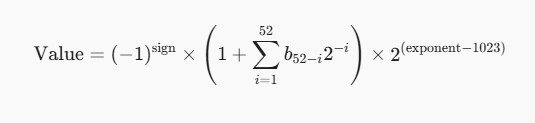
Memory Bit Allocation (IEEE 754 Double Precision)
| Bit Field | Allocated Width | Function |
| Sign Bit | 1 bit | Determines whether the number is positive (0) or negative (1). |
| Biased Exponent | 11 bits | Stores the binary power of two, offset by a bias of $+1023$. |
| Significand / Fraction | 52 bits | Stores the normalized binary precision bits (mantissa). |
Because memory uses base-2 exponents rather than base-10, converting a base-10 string like 1.06e-10 into IEEE 754 binary floating-point can introduce tiny representation adjustments.
Precision and Accuracy Limits in Programming Calculations
While floating-point numbers cover enormous scale ranges, their precision is strictly limited by bit width.
Double Precision (64-Bit) Limits
- Significant Digits: ≈ 15 to 17 base-10 decimal digits of precision.
- Maximum Value: approx 1.7976931348623157 * 10 ^ 308 (Double.MAX_VALUE ).
- Minimum Positive Value: approx 4.9 * 10 ^ – 324 (subnormal scale limit).
Floating-Point Imprecision Example
Consider adding a tiny value to a significantly larger value in code:
- Large Value: x = 1.0e16
- Small Value: y = 1.0
- Comparison Output: Evaluating x + y = x in Python returns False, but printing f”{x + y:.1f}” loses accuracy at lower decimal positions due to significand alignment bounds.
When performing operations across vastly different scales-such as adding 1 * 10 ^ – 16 to 1 * 10 ^ 16 the smaller number’s bits fall outside the 52-bit significand window and get swallowed entirely. This phenomenon is known as catastrophic cancellation or swallowing.
Handling Large and Small Numbers Efficiently in Programming
To process scientific calculations efficiently without encountering overflow or precision loss, follow these computational practices:
1. Order of Operations Optimization
When multiplying and dividing series of extreme values, alternate between large and small values to keep intermediate results within the standard floating-point scale range.
2. Logarithmic Scale Transformations
In fields like machine learning and bioinformatics, working directly with probabilities like $1.0 \times 10^{-300}$ leads to numerical underflow ($0.0$). Developers convert these calculations to the log domain to preserve precision:
log(ab) = log(a) + log(b)
3. Arbitrary-Precision Libraries
When absolute accuracy is required (such as financial systems or cryptography), replace standard floats with high-precision libraries:
- Python: decimal.Decimal
- Java: BigDecimal
- C++: GMP or Boost.Multiprecision
Limitations of Scientific Notation in Programming Environments
Despite its versatility, scientific notation in code comes with inherent edge cases:
- Binary-Decimal Conversion Errors: Decimals like 0.1 (1.0e-1) cannot be represented exactly in binary floating-point.
- Overflow to Infinity: Exceeding the maximum scale ( approx 1.8 * 10 ^ 308 ) results in Infinity or 1.0e+INF
- Underflow to Zero: Values smaller than subnormal limits quietly round down to 0.0.
- NaN (Not a Number): Invalid operations (such as 0.0 / 0.0 or sqrt(-1)) generate NaN values that propagate through calculations.
How Calculator Display Limits Affect Scientific Notation Outputs
Both physical hardware calculators and software-based calculator tools process scientific notation using dedicated display rules. However, understanding the Display Limits of Calculators reveals major differences in how numbers are handled compared to full programming environments:
- Fixed Display Windows: Hardware calculators often cap visible coefficients to 8, 10, or 12 digits, truncating values that standard 64-bit code logs easily.
- Internal Guard Digits: Most scientific calculators use 12 to 14 internal guard digits while displaying only 10, creating slight discrepancies when comparing console output directly with physical screen displays.
- Exponent Bounds: Many handheld calculators cap exponents between 10-99 and 1099, whereas standard f64 floats in code span up to 10±308.
Verifying Programmatic Results Using a Scientific Notation Calculator
When writing algorithms that process complex scientific formulas, developers should cross-verify output values using dedicated scientific notation tools.
Recommended Verification Workflow
- Extract Intermediate Outputs: Print raw values using explicit scientific formatting specifiers (%.12e).
- Audit Conversions: Check manually for conversion errors like non-normalized coefficients or incorrect signs
- Compare with Standard Tooling: Enter values into an independent scientific notation calculator to verify exponent and coefficient accuracy.
- Check for Order-of-Magnitude Shifts: Verify that arithmetic operations match expected theoretical outcomes.
Conclusion
Scientific notation in programming languages bridges the gap between readable human notation and high-speed binary computer hardware. By using E-notation, developers can represent scale ranges from subatomic particles to cosmological distances inside a compact 64-bit footprint.
Understanding the mechanics of IEEE 754 floating-point storage, significand precision limits, and exponent boundaries ensures your software remains accurate, stable, and free from catastrophic rounding errors.